
-
Compact Safety Notice -
Weekly Grants Lottery is live! Win a 20,000 ₪ jackpot — tickets are just 30 ₪, drawn every week. Buy your tickets »
You are using an out of date browser. It may not display this or other websites correctly.
You should upgrade or use an alternative browser.
You should upgrade or use an alternative browser.
How To Stop Chrome From Killing Your Computer
- Thread starter iamjohn
- Start date

M
748



How does the suspension work?How To Stop Chrome From Killing Your Computer

There was a time when I loved my Chrome browser very much, but from the first day of my blogging life, when I had to open lots of tabs to see different websites and multitask, I started realizing that this browser would kill my PC one day. Also, after seeing peoples negative reaction towards Chrome browser whenever we wrote something about it, I convinced myself that my opinions were right. This is a no denying fact that Chrome Browser is a RAM killer.
After searching a lot on the internet, I couldn’t find a single thing that could save my PC from the wrath of Chrome. So I switched to Firefox. Firefox is a great browser but if you wish to open lots of tabs, it hangs badly and the problem is still the same.
Recently, I stumbled upon with this extension called The Great Suspender and I think I am in love with my Chrome Browser again.
The Great Suspender is an easy-to-use tool. You just need to download and install the extension from Chrome Web Store. Once installed, you can set the time after which you want to suspend the tab. Tabs which are not in use will be suspended once crossed that time limit, which will again be activated when you click anywhere on the page.
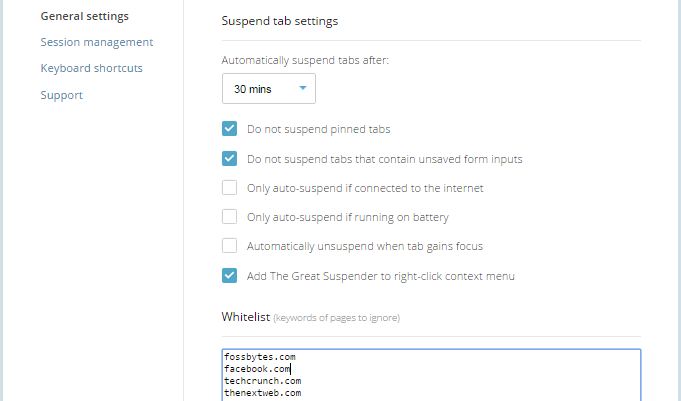
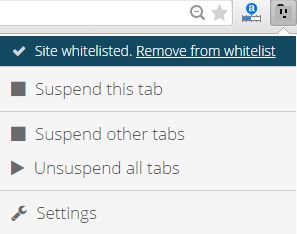
You can also set the list of websites that you don’t want to be suspended even after the time limit you set earlier. Also, you are all free to remove any site from whitelist.
If you were a regular Chrome user in past, this extension is worth trying and it’s possible that you would start loving your Chrome browser again.
SOURCE: Log in or register to view links
Nawwala po kaya ung data sa suspended tab? Thanks po
C
326
Nice tips. Ako nag switch sa firefox dahil nga sa memory issues kay chrome. Sguro worth it ulit i try
T
282
Today I learned, thank you!
I
0
Thanks sa info lodsHow To Stop Chrome From Killing Your Computer
There was a time when I loved my Chrome browser very much, but from the first day of my blogging life, when I had to open lots of tabs to see different websites and multitask, I started realizing that this browser would kill my PC one day. Also, after seeing peoples negative reaction towards Chrome browser whenever we wrote something about it, I convinced myself that my opinions were right. This is a no denying fact that Chrome Browser is a RAM killer.
After searching a lot on the internet, I couldn’t find a single thing that could save my PC from the wrath of Chrome. So I switched to Firefox. Firefox is a great browser but if you wish to open lots of tabs, it hangs badly and the problem is still the same.
Recently, I stumbled upon with this extension called The Great Suspender and I think I am in love with my Chrome Browser again.
The Great Suspender is an easy-to-use tool. You just need to download and install the extension from Chrome Web Store. Once installed, you can set the time after which you want to suspend the tab. Tabs which are not in use will be suspended once crossed that time limit, which will again be activated when you click anywhere on the page.
You can also set the list of websites that you don’t want to be suspended even after the time limit you set earlier. Also, you are all free to remove any site from whitelist.
If you were a regular Chrome user in past, this extension is worth trying and it’s possible that you would start loving your Chrome browser again.
SOURCE: Log in or register to view links
L
190
Best way is to switch to Firefox