

Welcome to Katz - Pinoy Underground Forum

Join us now to get access to all our features. Once registered and logged in, you will be able to create topics, post replies to existing threads, give reputation to your fellow members, get your own private messenger, and so, so much more. It's also quick and totally free, so what are you waiting for?
  • Compact Safety Notice
  • Weekly Grants Lottery is live! Win a 20,000 ₪ jackpot — tickets are just 30 ₪, drawn every week. Buy your tickets »

How To Stop Chrome From Killing Your Computer

I 2.1K

iamjohn

Corporal
Member
Access
Member
Access
Rising Star
11 Year Veteran 11y Veteran
Joined
Mar 7, 2015
Messages
569
Reaction score
449
Points
63
Age
126
grants
₲9,029
How To Stop Chrome From Killing Your Computer

chrome-eating-ram.jpg


There was a time when I loved my Chrome browser very much, but from the first day of my blogging life, when I had to open lots of tabs to see different websites and multitask, I started realizing that this browser would kill my PC one day. Also, after seeing peoples negative reaction towards Chrome browser whenever we wrote something about it, I convinced myself that my opinions were right. This is a no denying fact that Chrome Browser is a RAM killer.

After searching a lot on the internet, I couldn’t find a single thing that could save my PC from the wrath of Chrome. So I switched to Firefox. Firefox is a great browser but if you wish to open lots of tabs, it hangs badly and the problem is still the same.

Recently, I stumbled upon with this extension called The Great Suspender and I think I am in love with my Chrome Browser again.

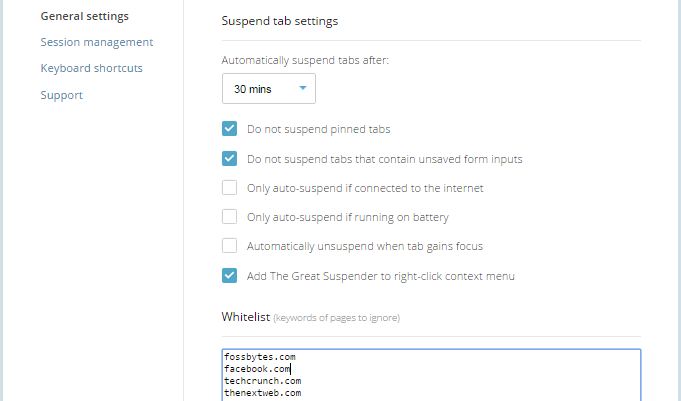
The Great Suspender is an easy-to-use tool. You just need to download and install the extension from Chrome Web Store. Once installed, you can set the time after which you want to suspend the tab. Tabs which are not in use will be suspended once crossed that time limit, which will again be activated when you click anywhere on the page.
great-suspender-settings.jpg


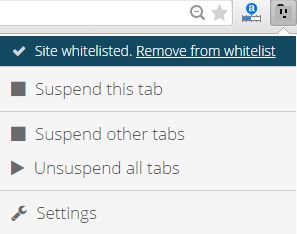
You can also set the list of websites that you don’t want to be suspended even after the time limit you set earlier. Also, you are all free to remove any site from whitelist.
great-suspender.jpg


If you were a regular Chrome user in past, this extension is worth trying and it’s possible that you would start loving your Chrome browser again.

SOURCE: http://fossbytes.com/how-to-stop-chrome-from-killing-your-computer/
 
  • Like
Reactions: jayfox20, bobsmith22211, imh0teph_007 and 5 others
J 29.5K

jughead3716

Alpha and Omega
Contributor
Ardent
Access
Contributor
Ardent
Access
Top Contributor
Community Legend
12 Year Veteran 12y Veteran
Joined
Jun 28, 2014
Messages
5,196
Reaction score
11,759
Points
113
grants
₲14,709
yup...magandang tool ito para sa mga power internet surfers tulad ko...hindi bumababa sa 3 ang mga open tabs ko palagi..mapa chrome o firefox kaya magandang tool ito...salamat sa pag share nito punkz... :cute: although mas babagay ata ito sa Techno Zone-->software section... :D
 
S 228

sanchvie

Abecedarian
Member
Access
Member
Access
3 Year Silver Member 3y Silver
Joined
Dec 15, 2022
Messages
64
Reaction score
3
Points
8
Age
25
Location
Manila
grants
₲368
How To Stop Chrome From Killing Your Computer

chrome-eating-ram.jpg


There was a time when I loved my Chrome browser very much, but from the first day of my blogging life, when I had to open lots of tabs to see different websites and multitask, I started realizing that this browser would kill my PC one day. Also, after seeing peoples negative reaction towards Chrome browser whenever we wrote something about it, I convinced myself that my opinions were right. This is a no denying fact that Chrome Browser is a RAM killer.

After searching a lot on the internet, I couldn’t find a single thing that could save my PC from the wrath of Chrome. So I switched to Firefox. Firefox is a great browser but if you wish to open lots of tabs, it hangs badly and the problem is still the same.

Recently, I stumbled upon with this extension called The Great Suspender and I think I am in love with my Chrome Browser again.

The Great Suspender is an easy-to-use tool. You just need to download and install the extension from Chrome Web Store. Once installed, you can set the time after which you want to suspend the tab. Tabs which are not in use will be suspended once crossed that time limit, which will again be activated when you click anywhere on the page.

great-suspender-settings.jpg


You can also set the list of websites that you don’t want to be suspended even after the time limit you set earlier. Also, you are all free to remove any site from whitelist.

great-suspender.jpg


If you were a regular Chrome user in past, this extension is worth trying and it’s possible that you would start loving your Chrome browser again.

SOURCE: Log in or register to view links
salamat dito bossing! grabe pumatay ang chrome ng ram sa panahon ngayon!
 
A 0

Anubis0666

Corporal
BANNED
Member
Access
Banned
Joined
Jan 15, 2023
Messages
414
Reaction score
4
Points
18
Age
41
Location
US
grants
₲623
How To Stop Chrome From Killing Your Computer

chrome-eating-ram.jpg


There was a time when I loved my Chrome browser very much, but from the first day of my blogging life, when I had to open lots of tabs to see different websites and multitask, I started realizing that this browser would kill my PC one day. Also, after seeing peoples negative reaction towards Chrome browser whenever we wrote something about it, I convinced myself that my opinions were right. This is a no denying fact that Chrome Browser is a RAM killer.

After searching a lot on the internet, I couldn’t find a single thing that could save my PC from the wrath of Chrome. So I switched to Firefox. Firefox is a great browser but if you wish to open lots of tabs, it hangs badly and the problem is still the same.

Recently, I stumbled upon with this extension called The Great Suspender and I think I am in love with my Chrome Browser again.

The Great Suspender is an easy-to-use tool. You just need to download and install the extension from Chrome Web Store. Once installed, you can set the time after which you want to suspend the tab. Tabs which are not in use will be suspended once crossed that time limit, which will again be activated when you click anywhere on the page.

great-suspender-settings.jpg


You can also set the list of websites that you don’t want to be suspended even after the time limit you set earlier. Also, you are all free to remove any site from whitelist.

great-suspender.jpg


If you were a regular Chrome user in past, this extension is worth trying and it’s possible that you would start loving your Chrome browser again.

SOURCE: Log in or register to view links
Will try this. Thank you.
 
Top Bottom