Welcome to Katz - Pinoy Underground Forum

Join us now to get access to all our features. Once registered and logged in, you will be able to create topics, post replies to existing threads, give reputation to your fellow members, get your own private messenger, and so, so much more. It's also quick and totally free, so what are you waiting for?
  • Compact Safety Notice
  • Weekly Grants Lottery is live! Win a 20,000 ₪ jackpot — tickets are just 30 ₪, drawn every week. Buy your tickets »

dl.katz.to [HBIT PREMIUM LIMITED] Step by step guide. Buying using grants

A 21.3K

ariraojosephine

Sugar Daddy
Ardent
Member
Access
Ardent
Member
Access
Community Legend
4 Year Silver Member 4y Silver
Joined
Mar 30, 2022
Messages
666
Reaction score
10,174
Points
93
Location
Philippines
grants
₲886
[HBIT PREMIUM LIMITED] Step by step guide. Buying using grants

1. Make sure you have enough grants to buy.

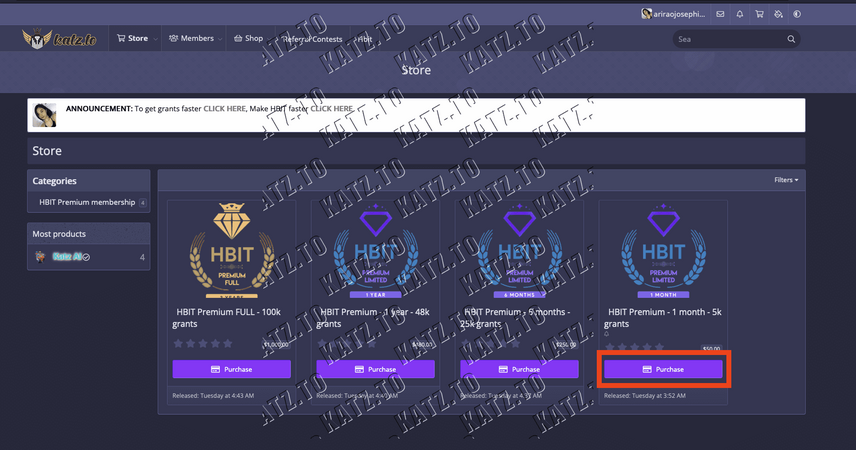
2. Go to the store section of katz.to And choose the plan you want
Screen Shot 2023 08 25 at 92501 AM


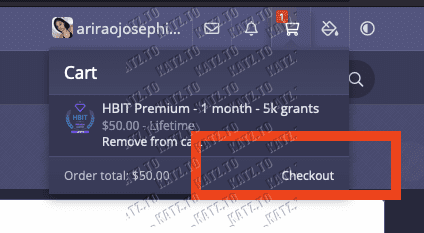
3. Press checkout button from the cart menu
Screen Shot 2023 08 25 at 93025 AM


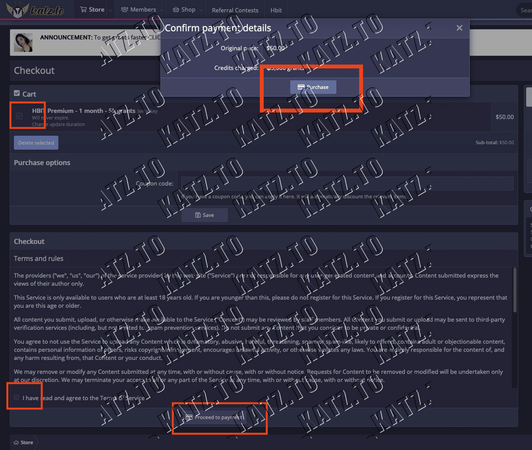
4. Make sure to check the cart item , terms of service and then press proceed to payment. Then press purchase


Screen Shot 2023 08 25 at 92208 AM

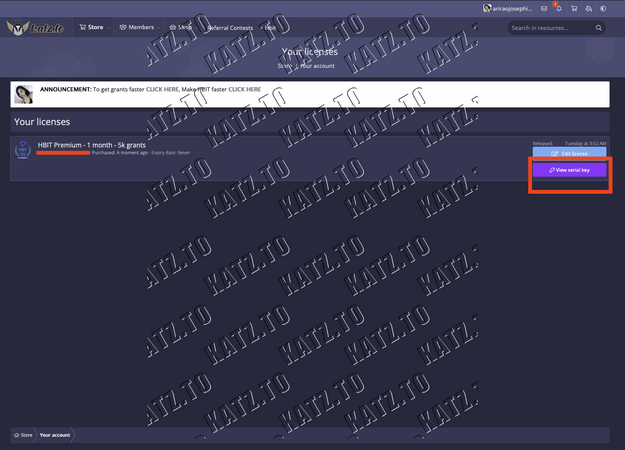
5. You will be redirected to "Your Licences" page . Just click view serial key

Screen Shot 2023 08 25 at 92229 AM


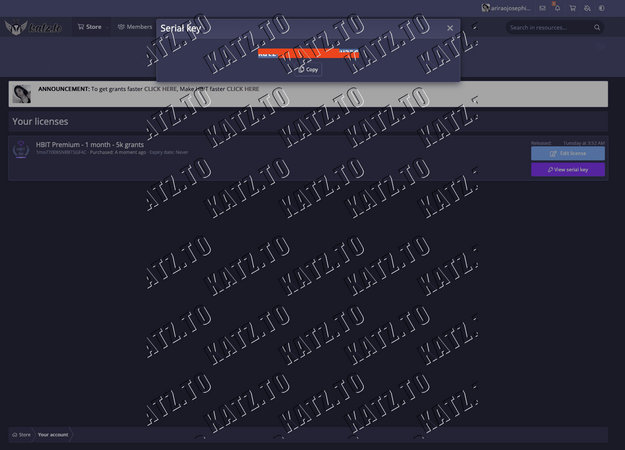
6. Your serial key will popup. Copy that serial key

Screen Shot 2023 08 25 at 92239 AM


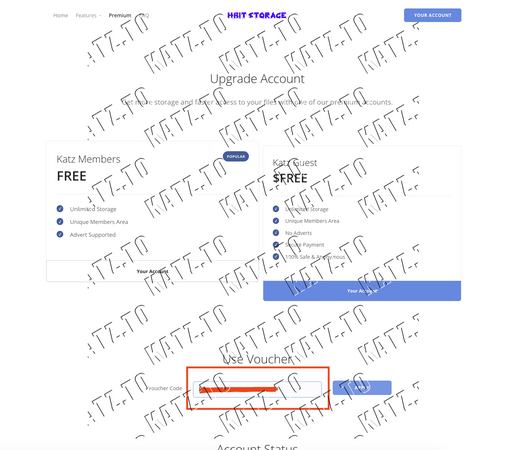
7. Go to hbit and login your account and press premium, or extend your account. Paste the serial key you just copied to the voucher code input box


Screen Shot 2023 08 25 at 92251 AM


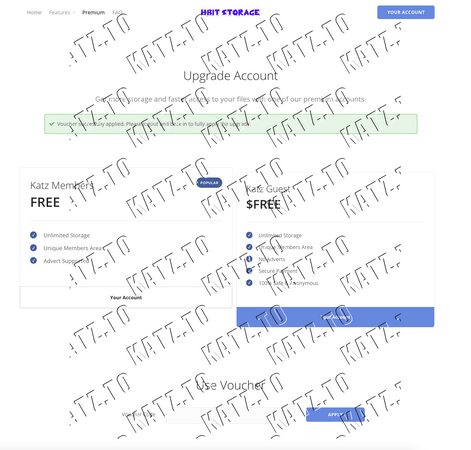
8. You will see a message that says success and you need to log-out and login again. (Although on my side I didn't have to) It will take some time load your account again.
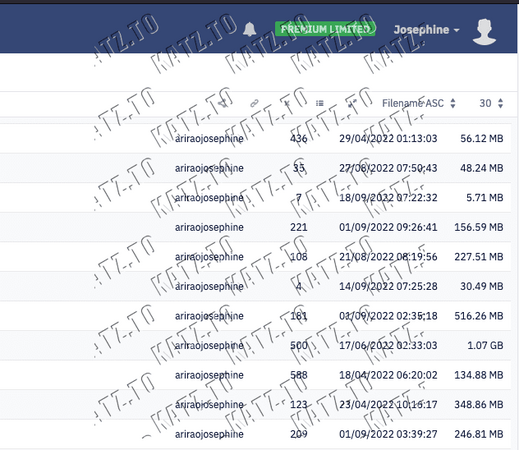
But once login you will see hbit premium limitted on the top right of your account page.
Screen Shot 2023 08 25 at 92303 AM


Screen Shot 2023 08 25 at 92755 AM

that's it folks.

You can now download hbit links directly no waiting time and higher speed limit.

 
  • Like
  • Love
  • Wow
Reactions: TomoXoXo, AngelMonochrome, Zenitsu Kusanagi and 145 others
K 1.2M

KatzSec DevOps

Alpha and Omega
Staff member
Moderator
Philanthropist
Access
Moderating
Philanthropist
Access
Top Contributor
Community Legend
4 Year Silver Member 4y Silver
Joined
Jan 17, 2022
Messages
1,180,342
Reaction score
22,072
Points
113
grants
₲3,486
ariraojosephine make sure you read the forum guides and the announcement before asking question and make sure that you post it in the right section para iwas warning or ban. Salamat
 
  • Like
Reactions: Mhiggz806, GuessWho, BillyC and 5 others
4mber 22.2K

4mber

⚘ ᴅ ɪ ᴠ ᴇ ʀ ɢ ᴇ ɴ ᴛ ⚘
Staff member
Shoutbox Mod
Access
Shoutbox Mod
Access
Community Legend
4 Year Silver Member 4y Silver
Joined
Nov 18, 2021
Messages
357
Reaction score
10,367
Points
93
Location
ꜰᴏʀᴛᴜɴᴀᴛᴇ ɪꜱʟᴇꜱ ๑
Website
divergent.fandom.com
grants
₲143,999
Well done bruhh ت

Love_the_Idea_3.gif
 
  • Like
Reactions: awtsu04, shadowss424, ryazhenka and 5 others
E 576

EarthSpirit

Corporal
Member
Access
Member
Access
2 Year Silver Member 2y Silver
Joined
Aug 25, 2023
Messages
430
Reaction score
14
Points
18
grants
₲441
[HBIT PREMIUM LIMITED] Step by step guide. Buying using grants

1. Make sure you have enough grants to buy.

2. Go to the store section of katz.to And choose the plan you want

View attachment 4720


3. Press checkout button from the cart menu
View attachment 4721


4. Make sure to check the cart item , terms of service and then press proceed to payment. Then press purchase


View attachment 4722

5. You will be redirected to "Your Licences" page . Just click view serial key


View attachment 4723


6. Your serial key will popup. Copy that serial key


View attachment 4724


7. Go to hbit and login your account and press premium, or extend your account. Paste the serial key you just copied to the voucher code input box


View attachment 4725


8. You will see a message that says success and you need to log-out and login again. (Although on my side I didn't have to) It will take some time load your account again.
But once login you will see hbit premium limitted on the top right of your account page.


View attachment 4726


View attachment 4727

that's it folks.

You can now download hbit links directly no waiting time and higher speed limit.

Copy po Thank you
 
  • Like
Reactions: Baileybailey123 and hahaygvavy
B 3.4K

BoyMatatag

2nd Account
Member
Access
Member
Access
Fan Favorite
2 Year Silver Member 2y Silver
Joined
Aug 27, 2023
Messages
340
Reaction score
1,409
Points
93
grants
₲3,635
[HBIT PREMIUM LIMITED] Step by step guide. Buying using grants

1. Make sure you have enough grants to buy.

2. Go to the store section of katz.to And choose the plan you want

View attachment 4720


3. Press checkout button from the cart menu
View attachment 4721


4. Make sure to check the cart item , terms of service and then press proceed to payment. Then press purchase


View attachment 4722

5. You will be redirected to "Your Licences" page . Just click view serial key


View attachment 4723


6. Your serial key will popup. Copy that serial key


View attachment 4724


7. Go to hbit and login your account and press premium, or extend your account. Paste the serial key you just copied to the voucher code input box


View attachment 4725


8. You will see a message that says success and you need to log-out and login again. (Although on my side I didn't have to) It will take some time load your account again.
But once login you will see hbit premium limitted on the top right of your account page.


View attachment 4726


View attachment 4727

that's it folks.

You can now download hbit links directly no waiting time and higher speed limit.

Thank you po sa tutorial
 
  • Like
Reactions: hahaygvavy
M 156

Multipotent06

2nd Account
Member
Access
Member
Access
2 Year Silver Member 2y Silver
Joined
Aug 29, 2023
Messages
40
Reaction score
4
Points
8
grants
₲179
Mraming
[HBIT PREMIUM LIMITED] Step by step guide. Buying using grants

1. Make sure you have enough grants to buy.

2. Go to the store section of katz.to And choose the plan you want

View attachment 4720


3. Press checkout button from the cart menu
View attachment 4721


4. Make sure to check the cart item , terms of service and then press proceed to payment. Then press purchase


View attachment 4722

5. You will be redirected to "Your Licences" page . Just click view serial key


View attachment 4723


6. Your serial key will popup. Copy that serial key


View attachment 4724


7. Go to hbit and login your account and press premium, or extend your account. Paste the serial key you just copied to the voucher code input box


View attachment 4725


8. You will see a message that says success and you need to log-out and login again. (Although on my side I didn't have to) It will take some time load your account again.
But once login you will see hbit premium limitted on the top right of your account page.


View attachment 4726


View attachment 4727

that's it folks.

You can now download hbit links directly no waiting time and higher speed limit.
Maraming salamat. Pag may ipon go nako rito para tumaas access and reputation ko.
 
  • Like
Reactions: hahaygvavy
N 142

nssrtrrs

Transcendent
Member
Access
Member
Access
2 Year Silver Member 2y Silver
Joined
Aug 31, 2023
Messages
32
Reaction score
2
Points
6
grants
₲111
[HBIT PREMIUM LIMITED] Step by step guide. Buying using grants

1. Make sure you have enough grants to buy.

2. Go to the store section of katz.to And choose the plan you want

View attachment 4720


3. Press checkout button from the cart menu
View attachment 4721


4. Make sure to check the cart item , terms of service and then press proceed to payment. Then press purchase


View attachment 4722

5. You will be redirected to "Your Licences" page . Just click view serial key


View attachment 4723


6. Your serial key will popup. Copy that serial key


View attachment 4724


7. Go to hbit and login your account and press premium, or extend your account. Paste the serial key you just copied to the voucher code input box


View attachment 4725


8. You will see a message that says success and you need to log-out and login again. (Although on my side I didn't have to) It will take some time load your account again.
But once login you will see hbit premium limitted on the top right of your account page.


View attachment 4726


View attachment 4727

that's it folks.

You can now download hbit links directly no waiting time and higher speed limit.

Nice complete details.
 
  • Like
Reactions: Baileybailey123 and dickus
S 148

Snowballx

Transcendent
Member
Access
Member
Access
2 Year Silver Member 2y Silver
Joined
Aug 31, 2023
Messages
32
Reaction score
5
Points
6
grants
₲123
[HBIT PREMIUM LIMITED] Step by step guide. Buying using grants

1. Make sure you have enough grants to buy.

2. Go to the store section of katz.to And choose the plan you want

View attachment 4720


3. Press checkout button from the cart menu
View attachment 4721


4. Make sure to check the cart item , terms of service and then press proceed to payment. Then press purchase


View attachment 4722

5. You will be redirected to "Your Licences" page . Just click view serial key


View attachment 4723


6. Your serial key will popup. Copy that serial key


View attachment 4724


7. Go to hbit and login your account and press premium, or extend your account. Paste the serial key you just copied to the voucher code input box


View attachment 4725


8. You will see a message that says success and you need to log-out and login again. (Although on my side I didn't have to) It will take some time load your account again.
But once login you will see hbit premium limitted on the top right of your account page.


View attachment 4726


View attachment 4727

that's it folks.

You can now download hbit links directly no waiting time and higher speed limit.
Thank you!
 
  • Like
Reactions: Simonbaliwqqqqqq, Baileybailey123 and dickus
Top Bottom