O
48.7K





Published 9/2023
MP4 | Video: h264, 1280x720 | Audio: AAC, 44.1 KHz
Language: English | Size: 488.73 MB | Duration: 0h 38m
Part Design workbench
MP4 | Video: h264, 1280x720 | Audio: AAC, 44.1 KHz
Language: English | Size: 488.73 MB | Duration: 0h 38m
Part Design workbench
What you'll learn
You'll learn to confidently design CAD models from the sketch to 3D
Workbenches included: Sketcher, Part Design
You'll acquire professional design engineer mindset and will negotiate for bigger salary
You'll confidently list your CATIA V5 skills in your resume
Requirements
Install CATIA V5 software on your computer
Description
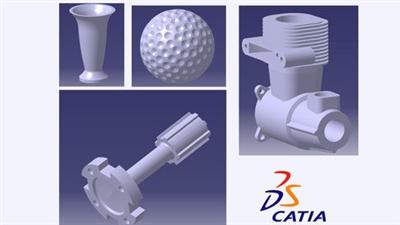
A brief summary of what you'll learn?1- An overview of the CATIA Workbenches Part Design, Assembly, Sketcher, Drafting, Generative Shape editor.2- An overview of the CATIA Part Design Workbench.3- How to create axis system.4- How to change color, transparency of the part .5- How to change background color.6- How to increase 3D display accuracy. 7- How to show Standard Views, Normal View.8- How to create 2D sketches Line, Infinite line, Bi-tangent line, Bisecting line, Line normal to curve9-How to create 2D sketches Circle,3 point circle, Tri-tangent circle, Arcs Types10-How to create 2D sketches Rectangle, Oriented Rectangle, Centered Rectangle.11-How to create 2D sketches Profiles.12 - How to adding Dimensions constraint to define your 2d sketch and modify it easily.13 - How to Change the Units system of the Sketch.14- How to mirror sketch.15- How to Symmetry Sketch. 16- How to Offset Sketch In this course, I will cover every aspect of Catia V5 software explain 2d sketch method and how to build dimensions constrains between the sketches to create any complex Designs easily , building your portfolio and be prepared for work in multinational companies ,This course will keep updating to cover all workbenches
Overview
Section 1: Introduction
Lecture 1 Introduction to CATIA V5 Software
Section 2: Part Design Workbench
Lecture 2 Introduction for Part Design Workbench
Lecture 3 Reference Planes, Axis System
Lecture 4 Units Settings
Lecture 5 Display Setting
Lecture 6 Standard Views, Normal View
Lecture 7 Show/Hide Part
Lecture 8 Changing Color and Transparency of the Part
Lecture 9 Changing Background Color
Lecture 10 Render Styles
Section 3: 2D Sketch
Lecture 11 Starting 2D Sketch
Lecture 12 Circle,3 point circle,Tri-tangent circle, Arcs Types
Lecture 13 Line, Infinite line, Bi-tangent line, Bisecting line, Line normal to curve
Lecture 14 Rectangle, Oriented Rectangle, Centered Rectangle
Lecture 15 Profile Sketch
Lecture 16 Dimensional Constraints, Sketch Solving Status
Lecture 17 Transformation tool- Mirror Sketch
Lecture 18 Transformation tool- Symmetry Sketch
Lecture 19 Transformation tool- Offset Sketch
This course is designed for beginners who interested in design 3D modeling using CATIA V5
Download link
rapidgator.net:
You must reply in thread to view hidden text.
uploadgig.com:
You must reply in thread to view hidden text.
nitroflare.com:
You must reply in thread to view hidden text.